UX CASE STUDY

Texas Instruments

Texas Instruments

Automating the Production Part Approval Process

Summary

Texas Instruments, a leader in semiconductor and integrated circuit design, set out to create a new application to automate the Production Part Approval Process (PPAP). Common in the automotive and aerospace industries, PPAP ensures manufacturers and suppliers communicate and approve production processes. 

The manual nature of this process led to costly delays and frustration for customers needing timely access to auto parts. The challenge was to streamline and automate the PPAP workflow to improve efficiency and reduce wait times.

My role

Lead UX/UI Designer, UX Researcher

The team

1 UX Designer, 1 Project Manager, Development team

Tools

UXpin, Adobe CC, Visual Studio Code, Bitbucket, GitHub, Jira, Confluence

Timeline

6 months

Business Constraints

Stringent timelines

Only 1 Designer

Limited research resources

Business requirements

01

New application to automate the PAPP process

02

Research

Research

03

Documentation

Documentation

Project lifecycle

01

Gather requirements from the product owner

02

Research

03

Concepts

04

UX Design - hi-fidelity

05

Hand-off and collaboration with developers
Research

Persona development

From discussions with the product team and insights gathered from user interviews, I understood that our users were:

• People involved in the procurement process
• Product Design people (includes design and build people)
• Supplier Quality Engineer
• Supplier Procurement
• Customer's Buyer
• Component Engineer
• Development Engineer
• Supplier Component Engineers
• Internal Customer Service Agent

How might we

The challenge was twofold: how might we design a form that was intuitive for customers while also enabling efficient management of their PPAPs. To solve this, 

I introduced a progressive disclosure form and a dedicated history page, allowing customers to easily manage, edit, and approve their PPAPs. I also created distinct versions for both customers and TI customer service teams to streamline support and management workflows.


Solution: Implement an automated, self-service Production Part Approval Process (PPAP) system to improve TI’s automotive revenue by optimizing customer service metrics. This solution digitized and automated what had traditionally been a manual, paper-based process.

Persona development

From discussions with the product team and insights gathered from user interviews, I understood that our users were:

• People involved in the procurement process
• Product Design people (includes design and build people)
• Supplier Quality Engineer
• Supplier Procurement
• Customer's Buyer
• Component Engineer
• Development Engineer
• Supplier Component Engineers
• Internal Customer Service Agent

How might we

The challenge was twofold: how might we design a form that was intuitive for customers while also enabling efficient management of their PPAPs. To solve this, 

I introduced a progressive disclosure form and a dedicated history page, allowing customers to easily manage, edit, and approve their PPAPs. I also created distinct versions for both customers and TI customer service teams to streamline support and management workflows.


Solution: Implement an automated, self-service Production Part Approval Process (PPAP) system to improve TI’s automotive revenue by optimizing customer service metrics. This solution digitized and automated what had traditionally been a manual, paper-based process.

Persona development

From discussions with the product team and insights gathered from user interviews, I understood that our users were:

• People involved in the procurement process
• Product Design people (includes design and build people)
• Supplier Quality Engineer
• Supplier Procurement
• Customer's Buyer
• Component Engineer
• Development Engineer
• Supplier Component Engineers
• Internal Customer Service Agent

How might we

The challenge was twofold: how might we design a form that was intuitive for customers while also enabling efficient management of their PPAPs. To solve this, 

I introduced a progressive disclosure form and a dedicated history page, allowing customers to easily manage, edit, and approve their PPAPs. I also created distinct versions for both customers and TI customer service teams to streamline support and management workflows.


Solution: Implement an automated, self-service Production Part Approval Process (PPAP) system to improve TI’s automotive revenue by optimizing customer service metrics. This solution digitized and automated what had traditionally been a manual, paper-based process.

Persona development

From discussions with the product team and insights gathered from user interviews, I understood that our users were:

• People involved in the procurement process
• Product Design people (includes design and build people)
• Supplier Quality Engineer
• Supplier Procurement
• Customer's Buyer
• Component Engineer
• Development Engineer
• Supplier Component Engineers
• Internal Customer Service Agent

How might we

The challenge was twofold: how might we design a form that was intuitive for customers while also enabling efficient management of their PPAPs. To solve this, 

I introduced a progressive disclosure form and a dedicated history page, allowing customers to easily manage, edit, and approve their PPAPs. I also created distinct versions for both customers and TI customer service teams to streamline support and management workflows.


Solution: Implement an automated, self-service Production Part Approval Process (PPAP) system to improve TI’s automotive revenue by optimizing customer service metrics. This solution digitized and automated what had traditionally been a manual, paper-based process.

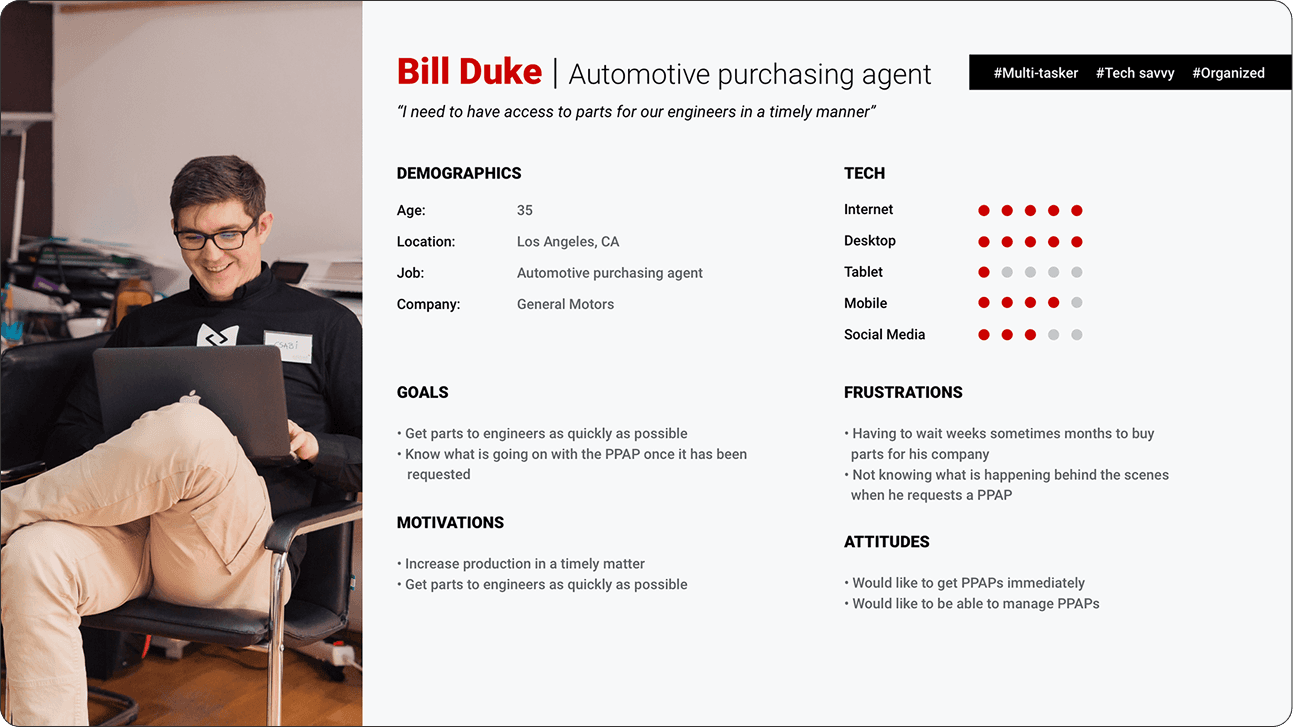
From the interviews, I compiled and constructed personas. This process involved distilling the collected information and insights from the interviews into fictional but representative characters that embody the key traits, behaviors, and needs identified during the interview process. These personas served as archetypal representations of the target audience, providing a valuable reference for design decisions and ensuring a user-centered approach in the development of PropertyPhotos.

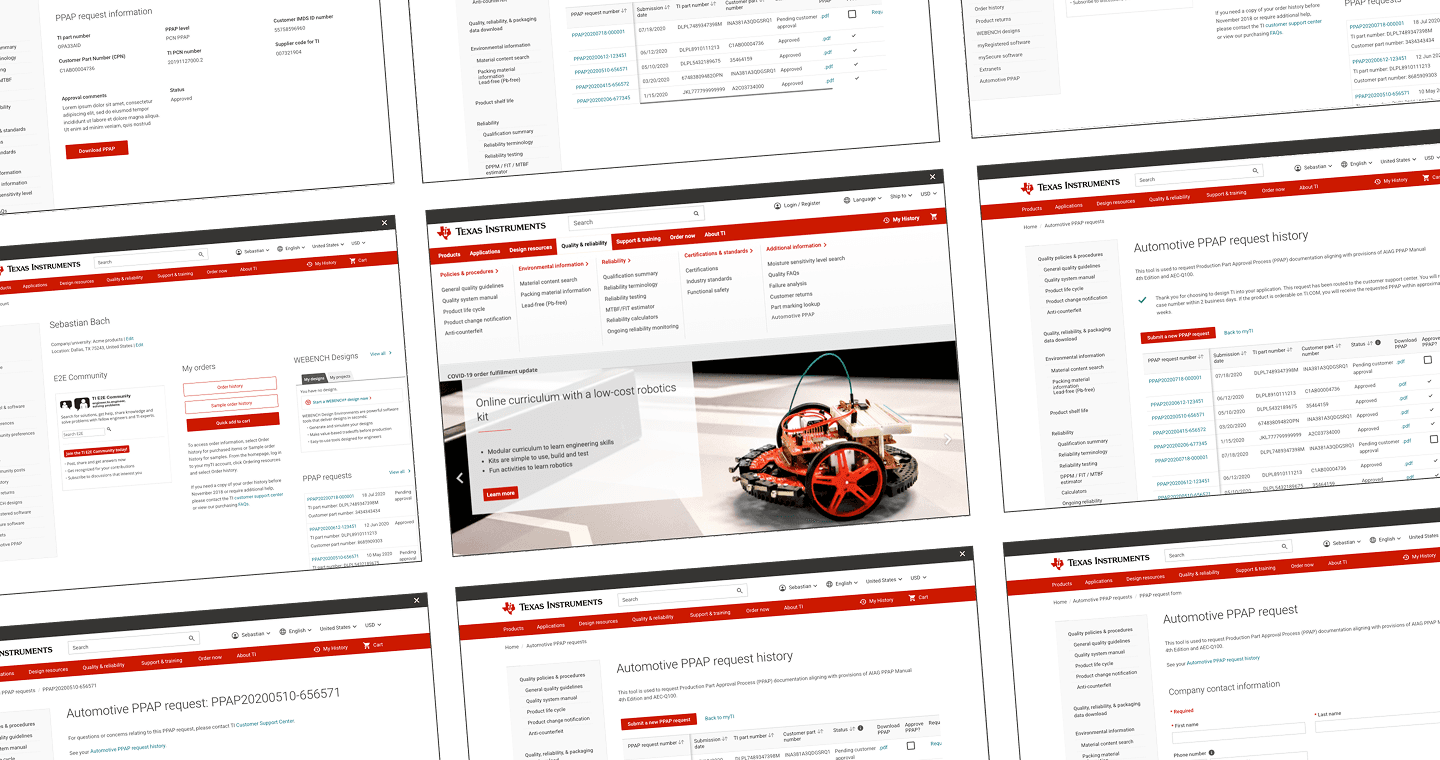
PAPP screens

Outcomes

I stayed closely involved in the development of the federated search feature, reviewing progress and ensuring the implementation matched the design specifications. One of Trimble’s subsidiary companies reviewed our work and responded with strong, positive feedback on the improvements we introduced.


As for the concept car project, we were just about to hand off our work to the team responsible for producing the final video when an unexpected round of layoffs impacted our entire team, bringing the project to an abrupt end.

Research

Persona development

From discussions with the product team and insights gathered from user interviews, I understood that our users were:

• People involved in the procurement process
• Product Design people (includes design and build people)
• Supplier Quality Engineer
• Supplier Procurement
• Customer's Buyer
• Component Engineer
• Development Engineer
• Supplier Component Engineers
• Internal Customer Service Agent

Homepage (final design)

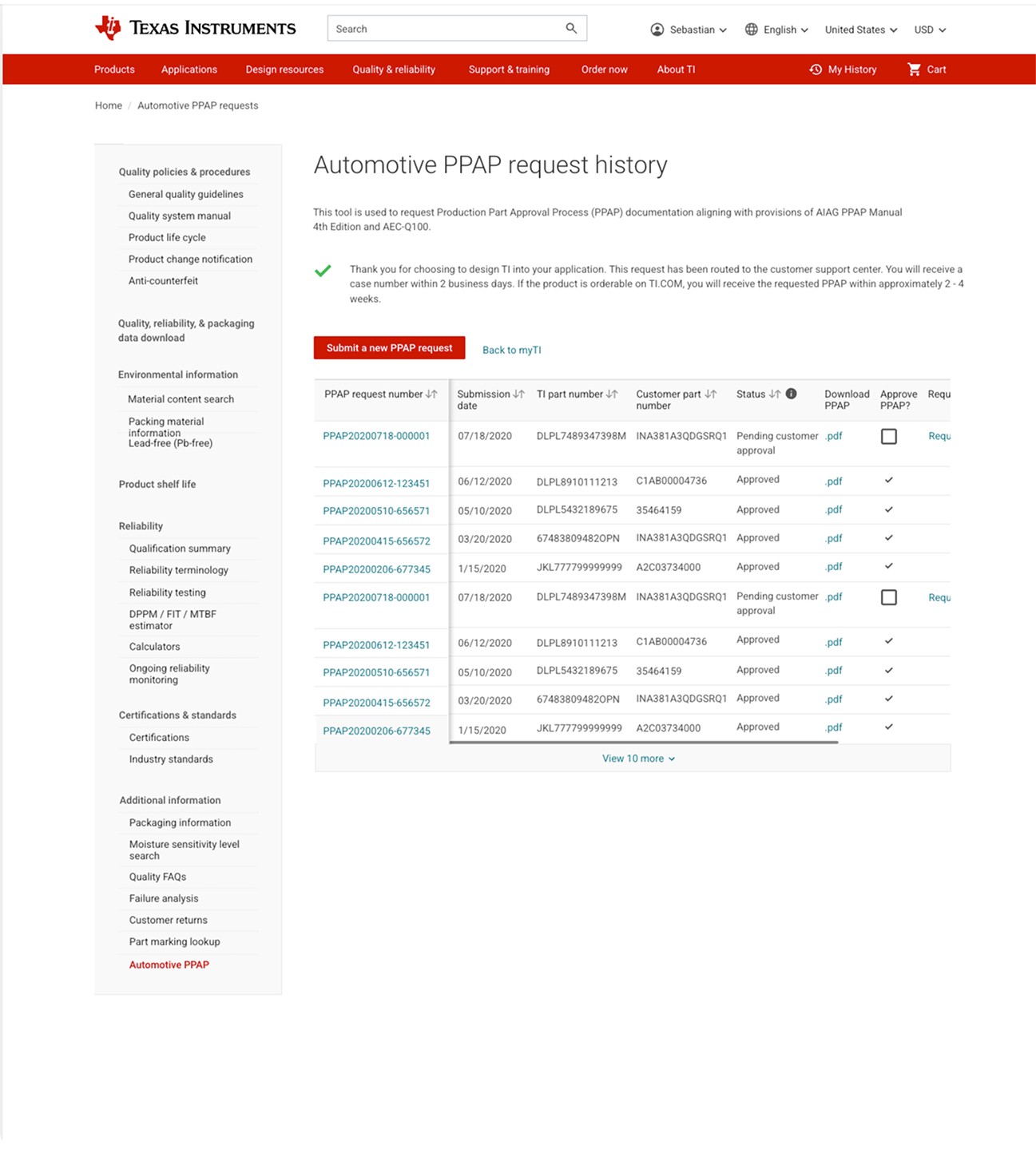
PPAP history page in the Quality and Reliability space. It can be accessed through the side navigation.

High fidelity design

There was initial discussion about whether to house the application within the Quality and Reliability section or the Customer Dashboard/Profile. I designed for both, starting with the Quality space. As the dashboard redesign progressed, I collaborated with the team working on the Dashboard/Profile, and we ultimately chose to integrate PPAP access into the Dashboard/Profile, where customers manage their information and purchases. PPAP is also reachable through the global navigation and Quality section for flexibility.


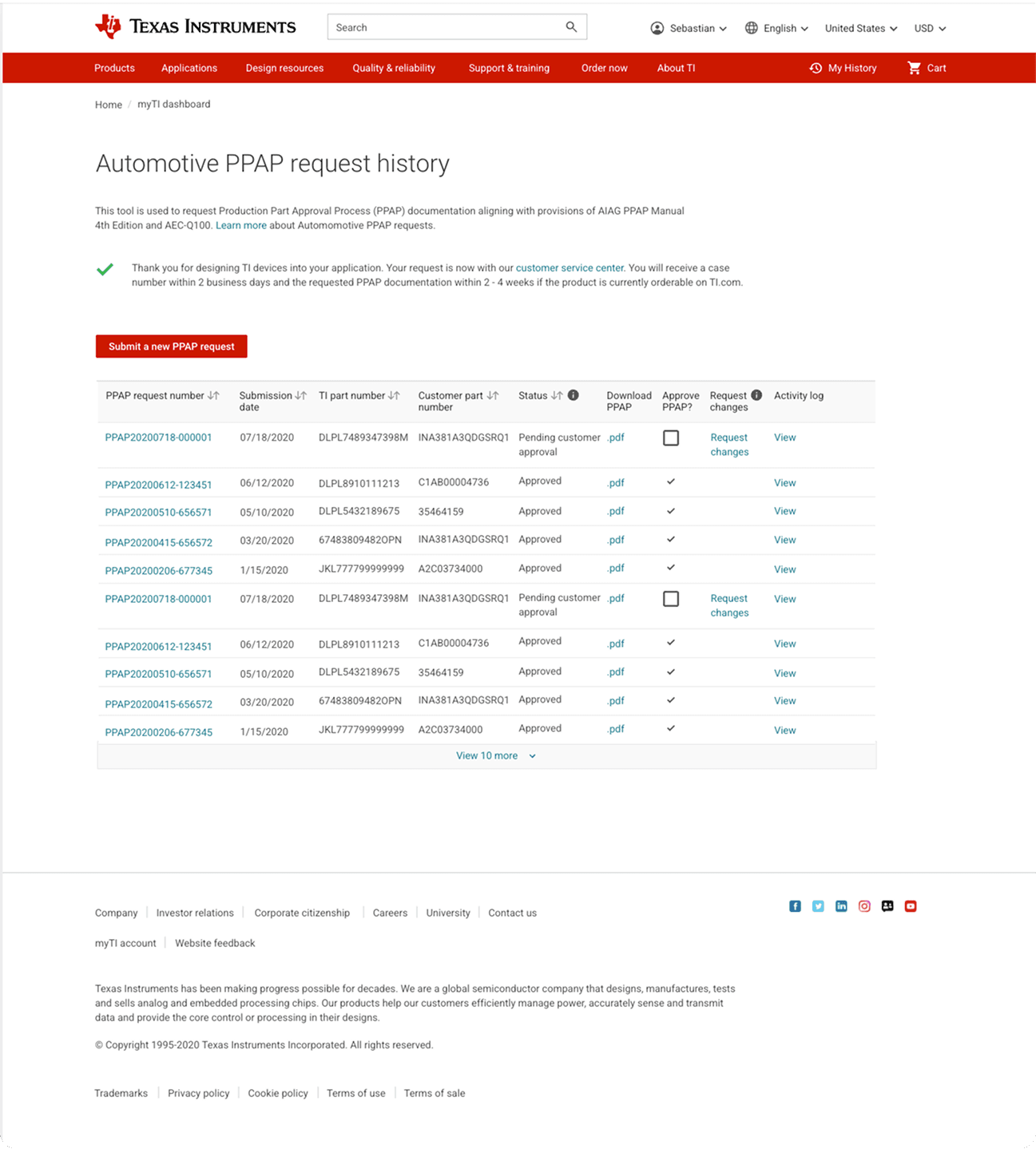
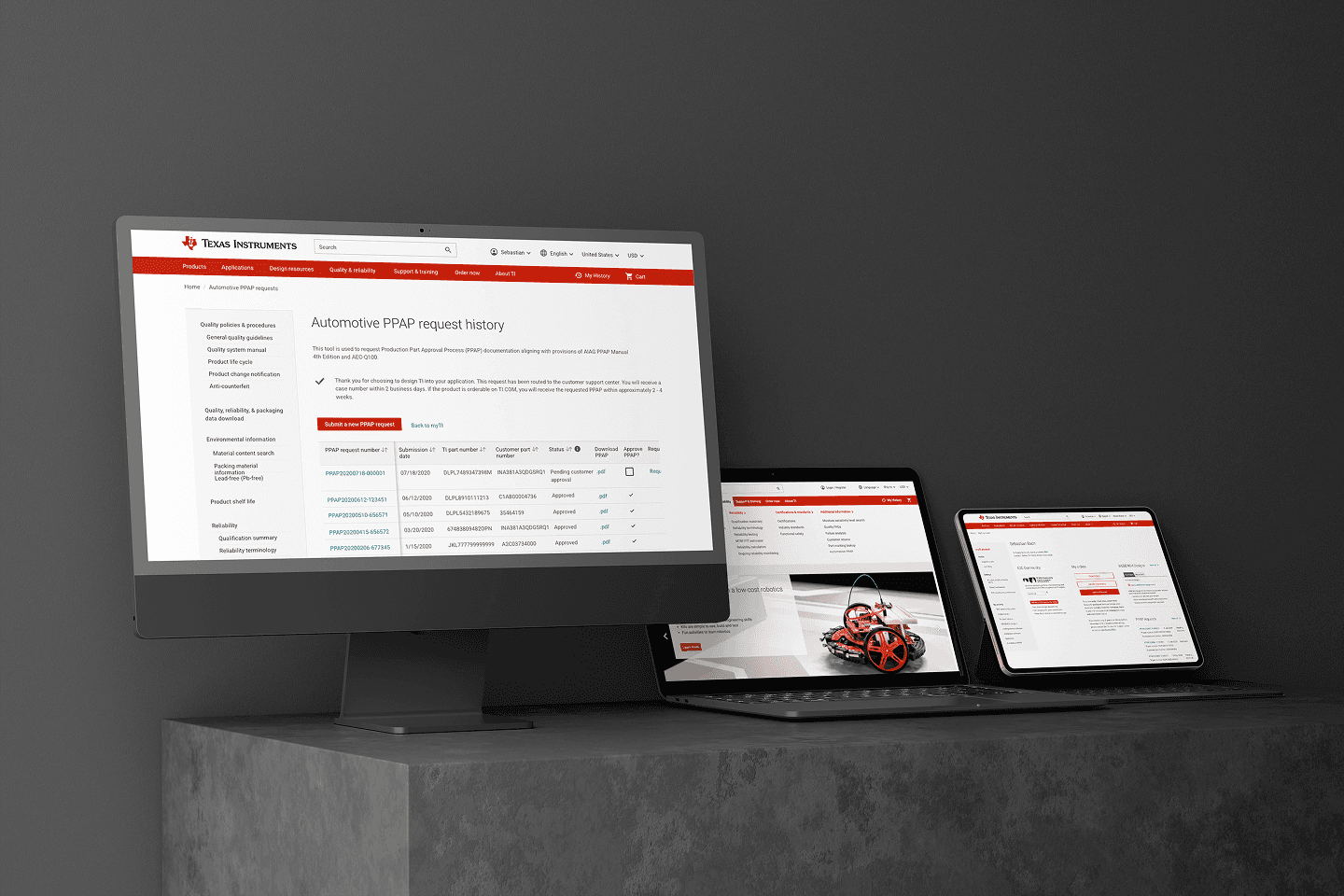
The images display the PPAP request history page in two contexts: the Quality version (Screen 1) with side navigation, and the Dashboard/Profile version (Screen 2) without it. Customers can easily access their PPAPs through a dashboard link and breadcrumbs. A sticky first column was added to keep key information visible while scrolling. In the prototype, approved PPAPs are clearly indicated with a checkmark in the history table.

Download the UXpin files and open the “Index” file on your browser

Automotive PPAP request history

How might we

The challenge was twofold: how might we design a form that was intuitive for customers while also enabling efficient management of their PPAPs. To solve this, 

I introduced a progressive disclosure form and a dedicated history page, allowing customers to easily manage, edit, and approve their PPAPs. I also created distinct versions for both customers and TI customer service teams to streamline support and management workflows.


Solution: Implement an automated, self-service Production Part Approval Process (PPAP) system to improve TI’s automotive revenue by optimizing customer service metrics. This solution digitized and automated what had traditionally been a manual, paper-based process.

PAPP screens

Homepage (final design)

Coming from the Customer Dashboard without side navigation.

Homepage (final design)

Homepage (final design)

Coming from the Customer Dashboard without side navigation.

How might we

The challenge was twofold: how might we design a form that was intuitive for customers while also enabling efficient management of their PPAPs. To solve this, 

I introduced a progressive disclosure form and a dedicated history page, allowing customers to easily manage, edit, and approve their PPAPs. I also created distinct versions for both customers and TI customer service teams to streamline support and management workflows.


Solution: Implement an automated, self-service Production Part Approval Process (PPAP) system to improve TI’s automotive revenue by optimizing customer service metrics. This solution digitized and automated what had traditionally been a manual, paper-based process.

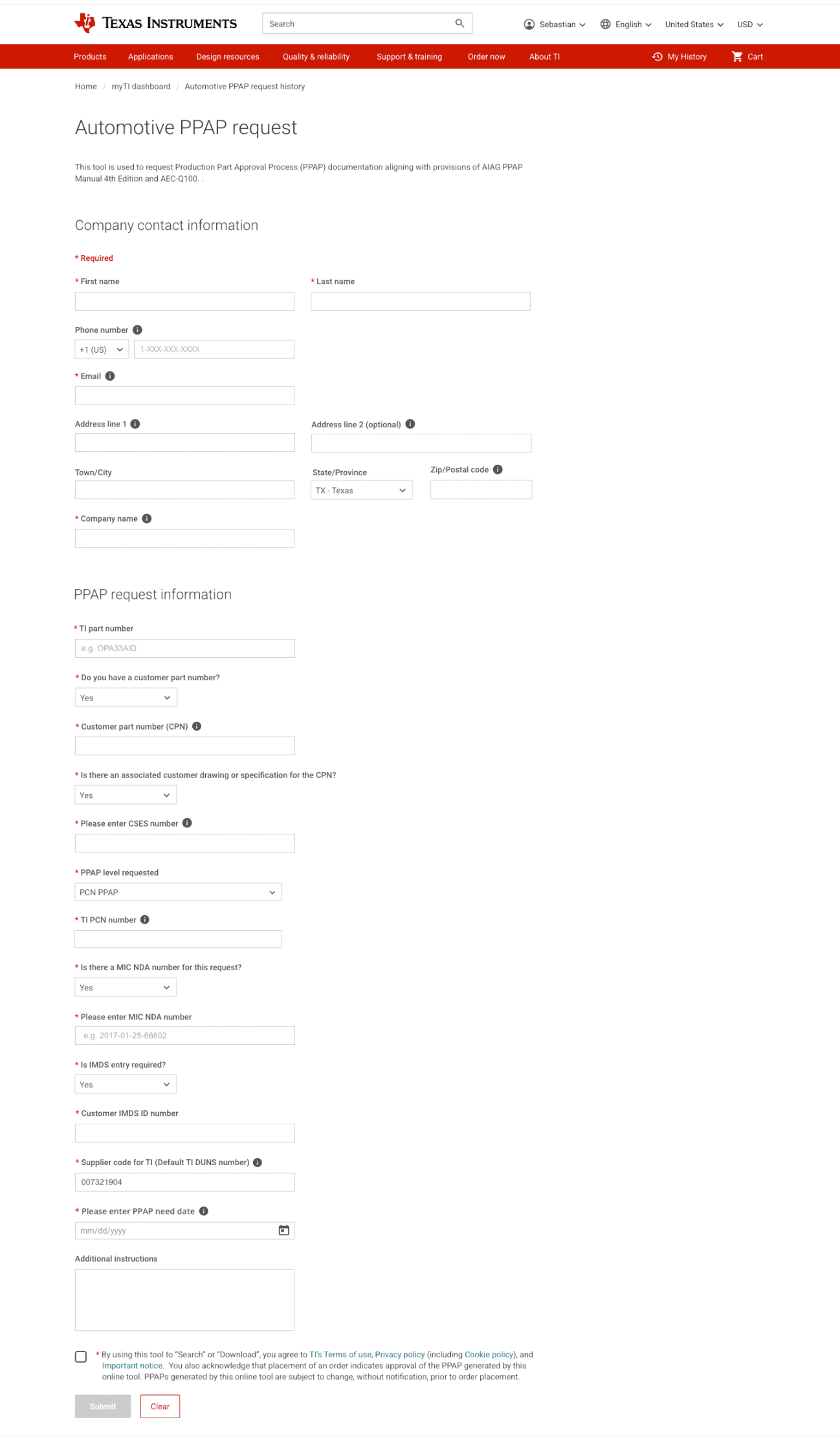
PPAP forms

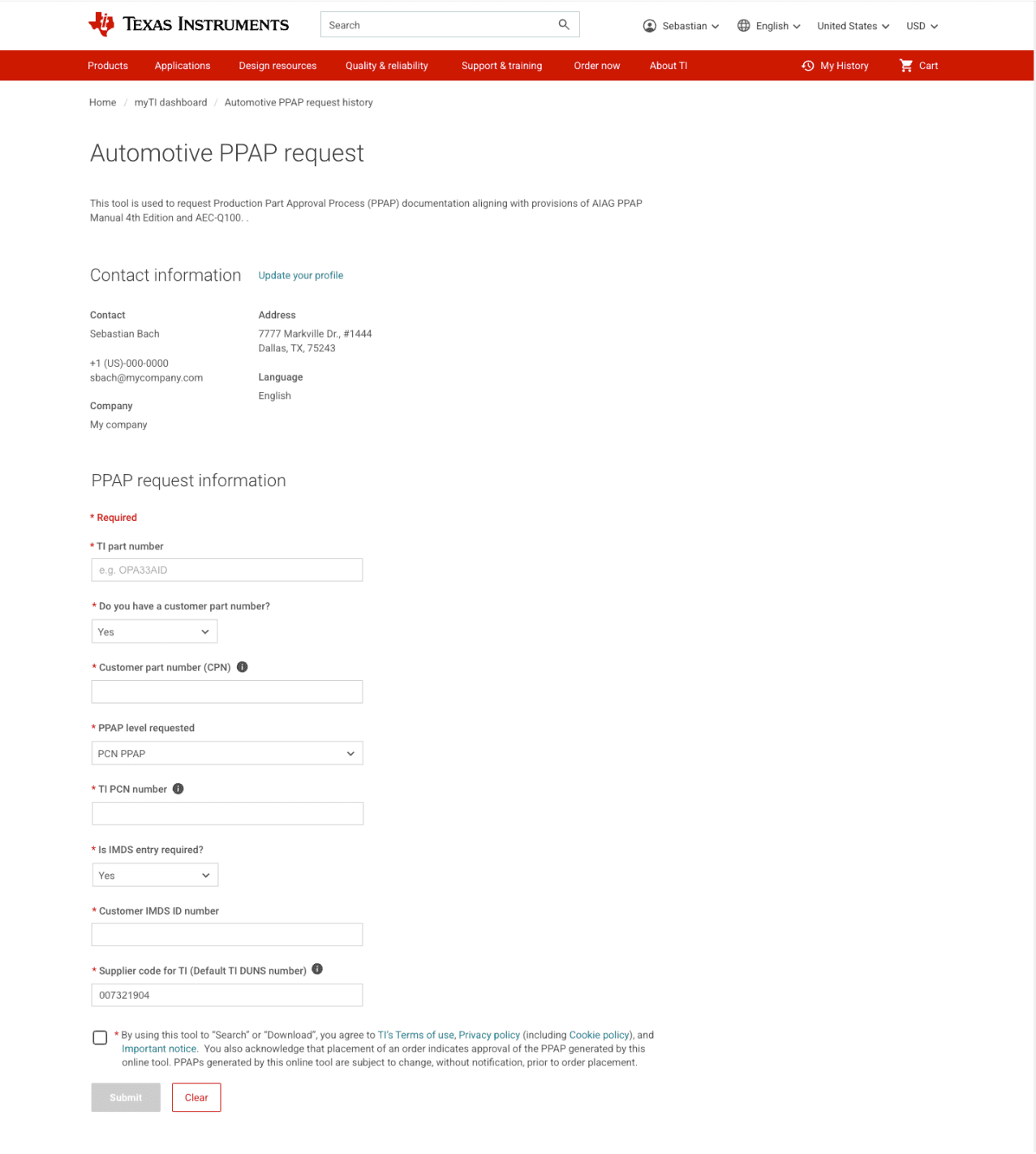
I implemented a progressive disclosure approach for the PPAP form and designed a history table with integrated modals for approvals, along with an activity log. Within the table, customers can easily view and edit any PPAP entry.
Homepage (final design)

Customer PPAP form: The progressive disclosure layout of the customer form reveals additional inputs 

as the customer answers questions through the drop-down menus.

Homepage (final design)

Customer Service Agent PPAP form: This form functions similarly to the Customer PPAP form but includes 

an additional section to capture company contact information.

Homepage (final design)

Customer Service Agent PPAP form: This form functions similarly to the Customer PPAP form but includes 

an additional section to capture company contact information.

Customer PPAP form: The progressive disclosure layout of the customer form reveals additional inputs 

as the customer answers questions through the drop-down menus.

Homepage (final design)

Customer Service Agent PPAP form: This form functions similarly to the Customer PPAP form but includes 

an additional section to capture company contact information.

Homepage (final design)

Homepage (final design)

Customer PPAP form: The progressive disclosure layout of the customer form reveals additional inputs 

as the customer answers questions through the drop-down menus.

Homepage (final design)

Customer Service Agent PPAP form: This form functions similarly to the Customer PPAP form but includes 

an additional section to capture company contact information.

Homepage (final design)

Customer PPAP form: The progressive disclosure layout of the customer form reveals additional inputs 

as the customer answers questions through the drop-down menus.

Homepage (final design)

Customer PPAP form: The progressive disclosure layout of the customer form reveals additional inputs 

as the customer answers questions through the drop-down menus.

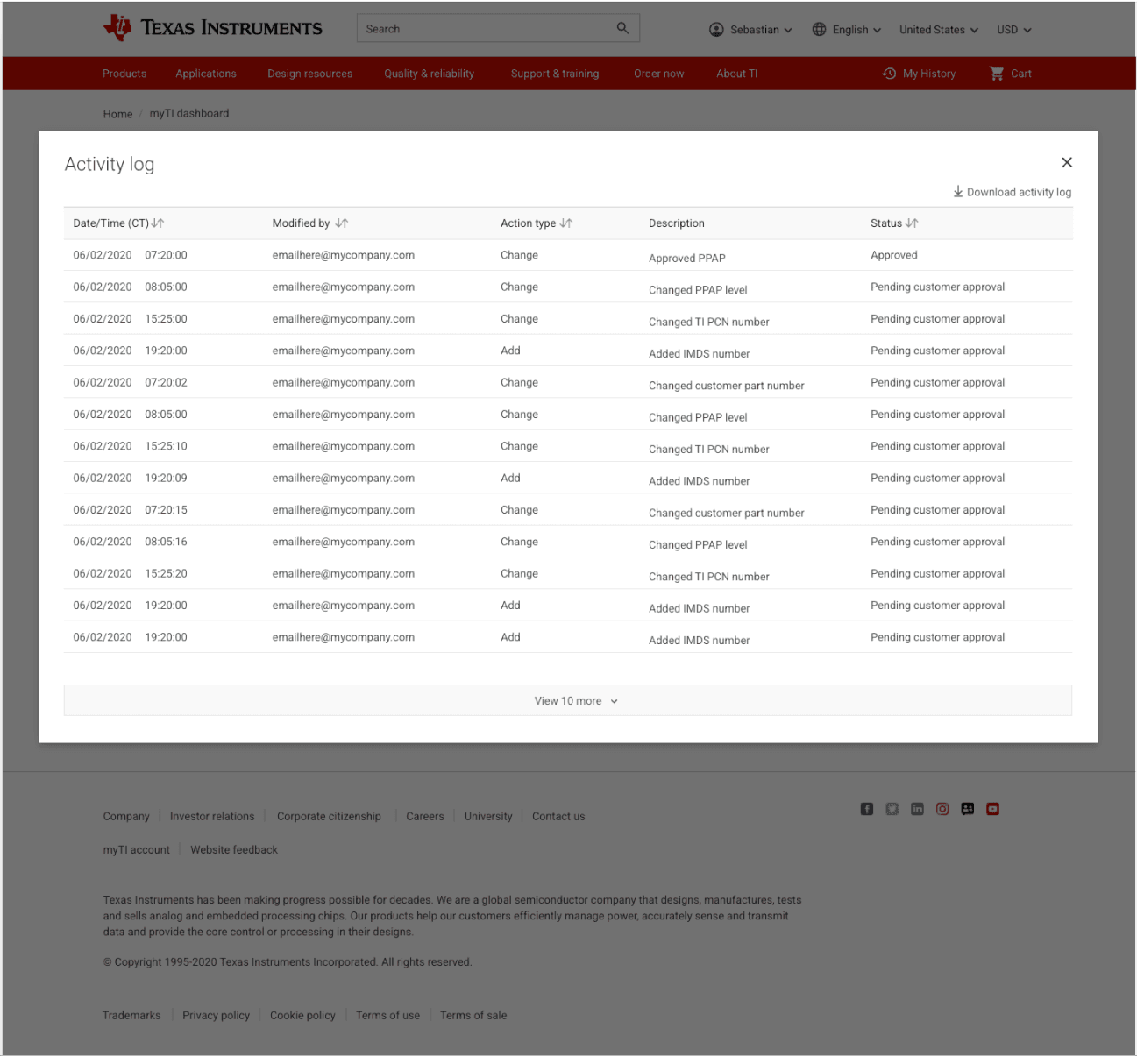
Activity log modal

Users can view their activity log by clicking the link in the table for the desired PPAP. Within the modal, they can download the activity log and see a record of all actions taken for that specific PPAP.
Homepage (final design)

Activity log modal

Homepage (final design)

Activity log modal

Activity log modal

Homepage (final design)

Homepage (final design)

Activity log modal

Homepage (final design)

Activity log modal

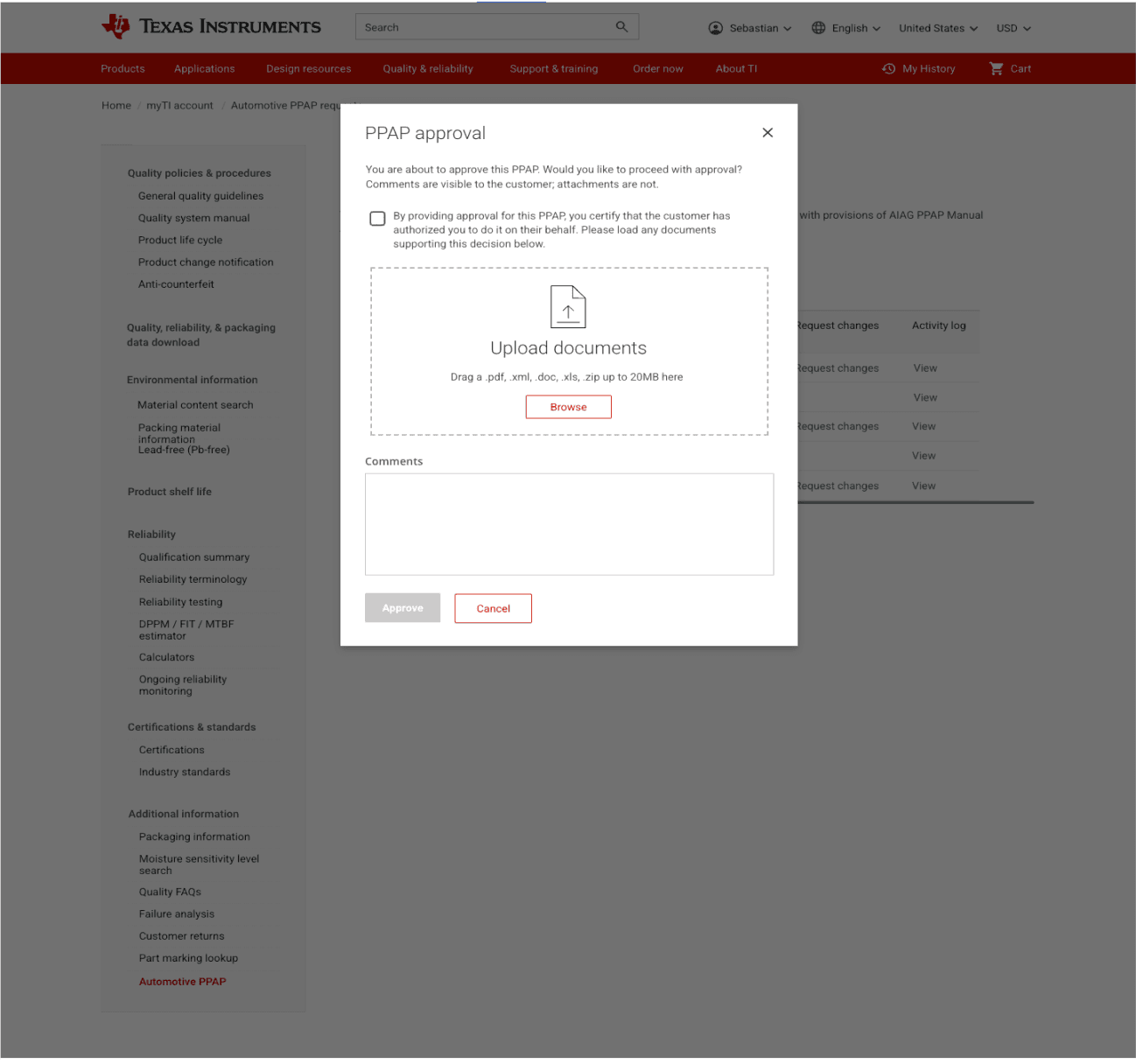
PPAP approval modal

When users click the approval link, a modal opens where they can upload supporting documents and leave comments. These details will appear in the view-only form, accessible by clicking the PPAP number in the table.
Homepage (final design)

PAPP approval modal

Homepage (final design)

PAPP approval modal

Homepage (final design)

PAPP approval modal

Homepage (final design)

PAPP approval modal

Homepage (final design)

PAPP approval modal

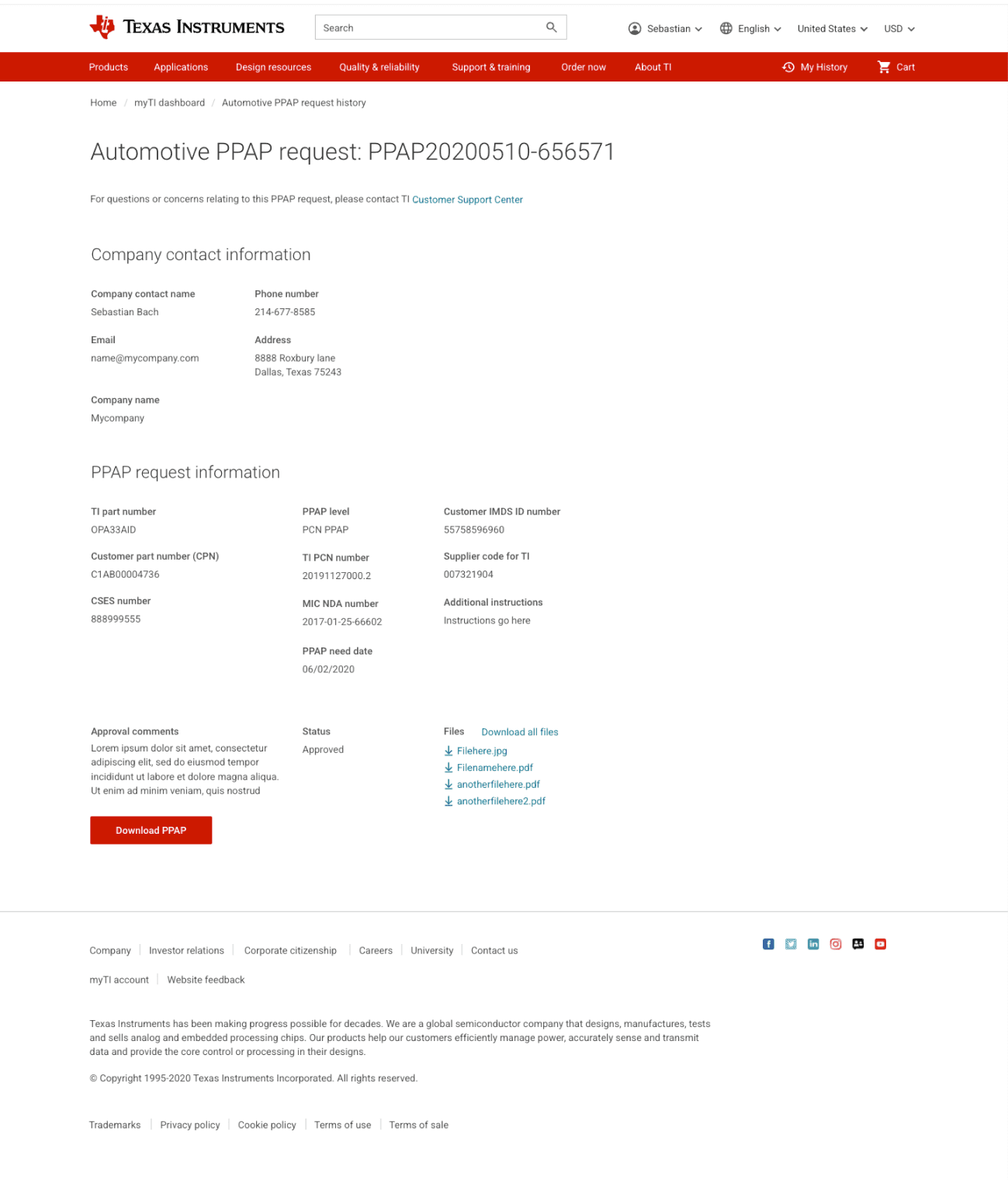
Read-only PPAP

Users can access the PPAP document, where they can check the status, download files, view comments, review contact information, and explore any other pertinent details associated with a specific PPAP.
Homepage (final design)

Read-only PPAP

Homepage (final design)

Read-only PPAP

Homepage (final design)


Read-only PPAP

Homepage (final design)


Read-only PPAP

Homepage (final design)

Read-only PPAP

Project outcomes

Next Steps

Focus on automating all levels of PPAP’s.

Outcomes

The initial release successfully focused on automating Level 1 PPAPs, which are the least complex. Future iterations will expand automation to cover all PPAP levels, making them immediately available. This improvement aims to streamline the PPAP process for engineers, designers, and TI customer service teams.

To see other TI projects contact me.

Homepage (final design)

PPAP history page in the Quality and Reliability space. It can be accessed through the side navigation.

Homepage (final design)

Coming from the Customer Dashboard without side navigation.

High fidelity design

There was initial discussion about whether to house the application within the Quality and Reliability section or the Customer Dashboard/Profile. I designed for both, starting with the Quality space. As the dashboard redesign progressed, I collaborated with the team working on the Dashboard/Profile, and we ultimately chose to integrate PPAP access into the Dashboard/Profile, where customers manage their information and purchases. PPAP is also reachable through the global navigation and Quality section for flexibility.


The images display the PPAP request history page in two contexts: the Quality version (Screen 1) with side navigation, and the Dashboard/Profile version (Screen 2) without it. Customers can easily access their PPAPs through a dashboard link and breadcrumbs. A sticky first column was added to keep key information visible while scrolling. In the prototype, approved PPAPs are clearly indicated with a checkmark in the history table.

Download the UXpin files and open the “Index” file on your browser

Automotive PPAP request history